Upload a video. AI makes the first edit.

139 bought
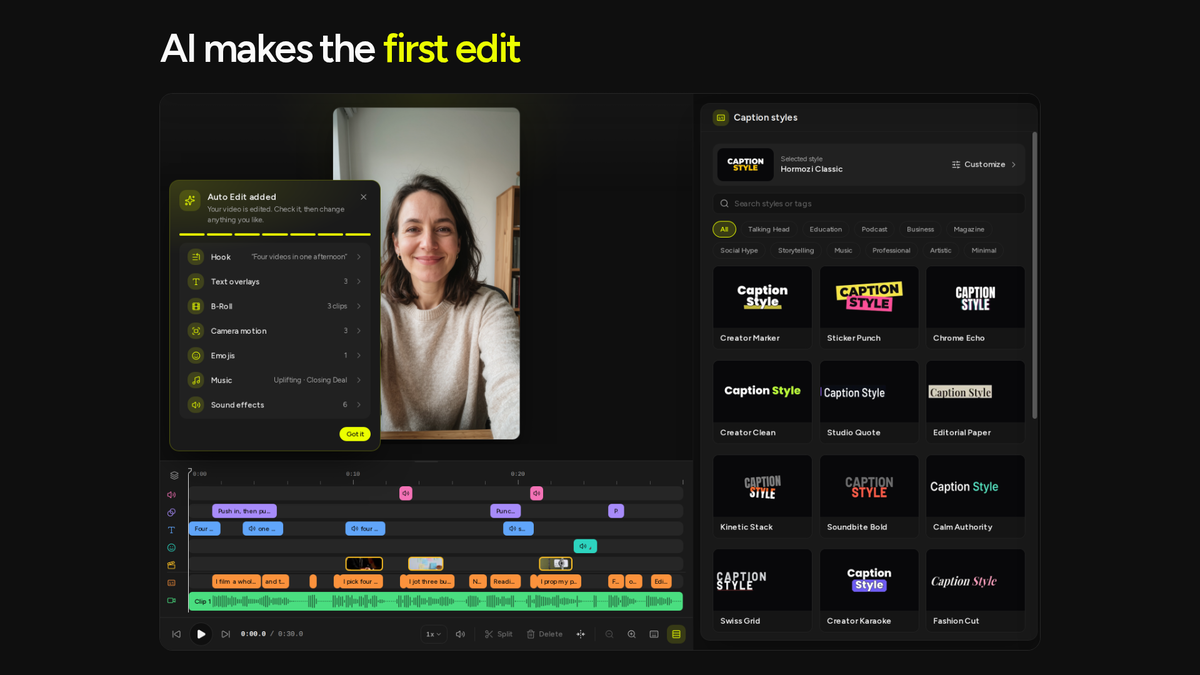
Auto Edit result card
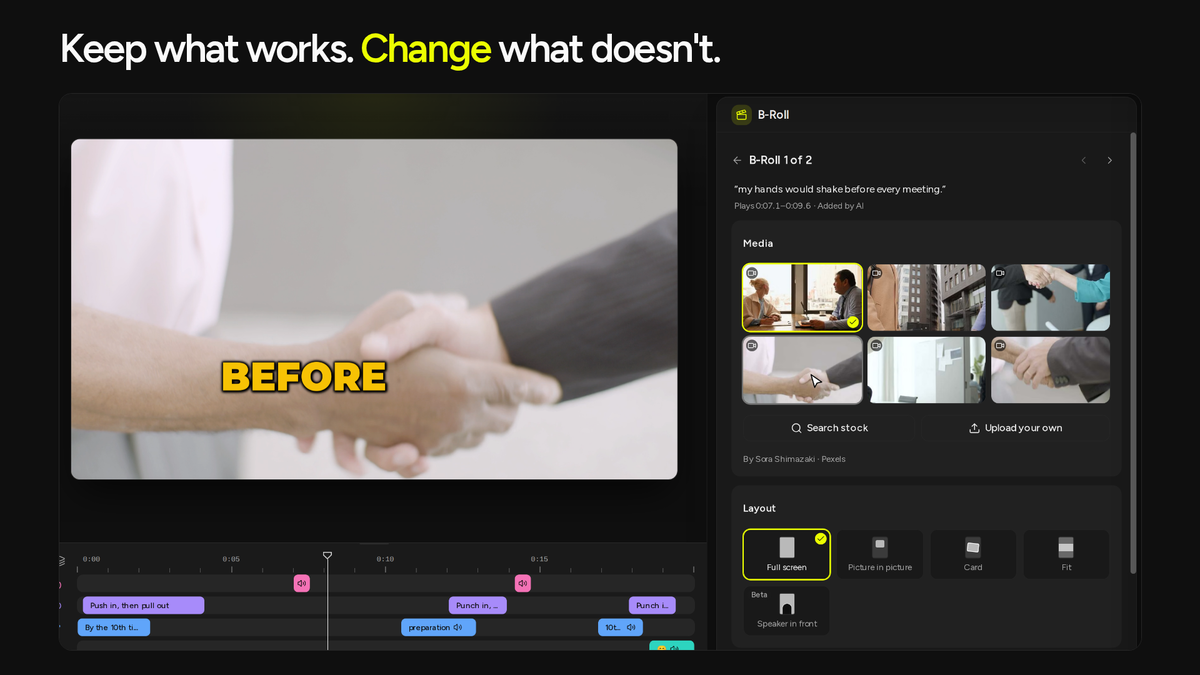
B-Roll alternatives to swap in
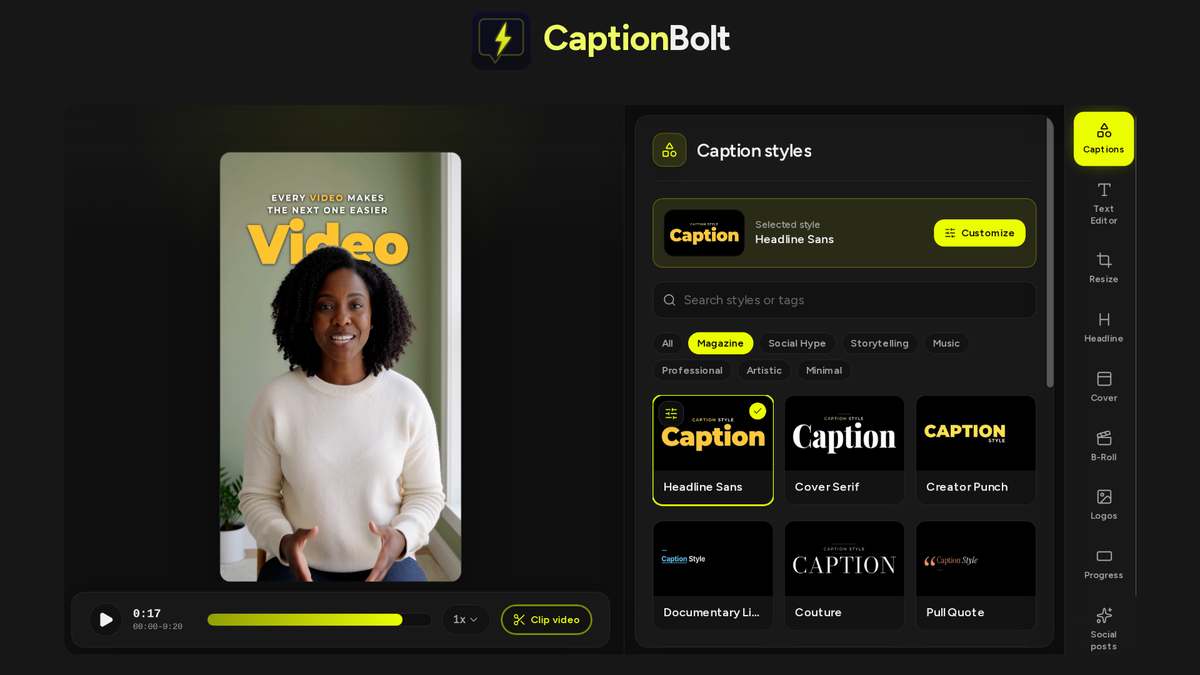
Magazine caption styles
Video and subtitle downloads

CaptionBolt

-92%$39
$468
once, no subscription
Only on AppSumoLimited-time deal
  • Lifetime access
  • Refundable up to 60 days
  • Plus members are covered by our We Got Your Back guarantee
AppSumo Launchpad

Chosen by AppSumo for their potential and innovation

What buyers say

“CaptionBolt worked really well for adding titles to my video. I was initially just testing it out because Premiere's built-in title generator is too limited, but I downloaded Caption Bolt and ran…”

AI video editor for your short videos, with B-Roll, captions, a hook, music, and sound effects

Up to 1,200Processing minutes / month
Up to 20 minMax video length
From $39once, forever
  • Get back an edited draft with B-Roll, captions, an opening hook, music, and sound effects already in place
  • Keep what works and change what doesn't, with no extra processing minutes for AI tools in the Editor
  • Works with Pexels
  • Alternative to DescriptDescript, CapCutCapCut

From raw recording to a video ready to post

AI adds B-Roll, captions, music, and more for you

  • Choose what AI adds to your talking video when you upload: an opening text hook, text overlays, B-Roll, camera moves, emojis, music, and sound effects, with captions always included
  • Get B-Roll that matches your words, placed on the lines it illustrates
  • See everything AI added in one list, or why it skipped an item, and jump to any item to change it
  • Use Auto Edit on every tier, with no extra processing minutes for Auto Edit or other AI tools in the Editor (fair-use limits apply)
AI adds B-Roll, captions, music, and more for you

Keep what works, change what doesn't

  • Swap a B-Roll clip in one click from AI-picked alternatives, or search Pexels and upload your own
  • Rewrite the hook, fix a caption, or remove an emoji, while keeping the rest of your edit as it is
  • Ask AI to try again without overwriting the changes you've made
  • Undo the first edit in one step if you'd rather start from your original recording
Keep what works, change what doesn't

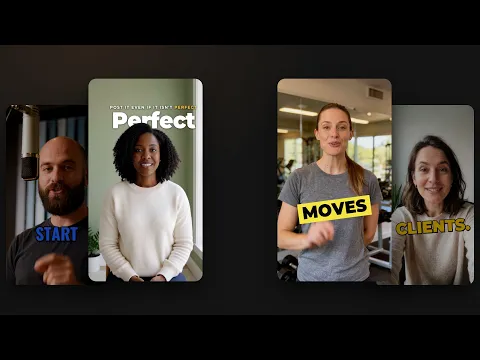
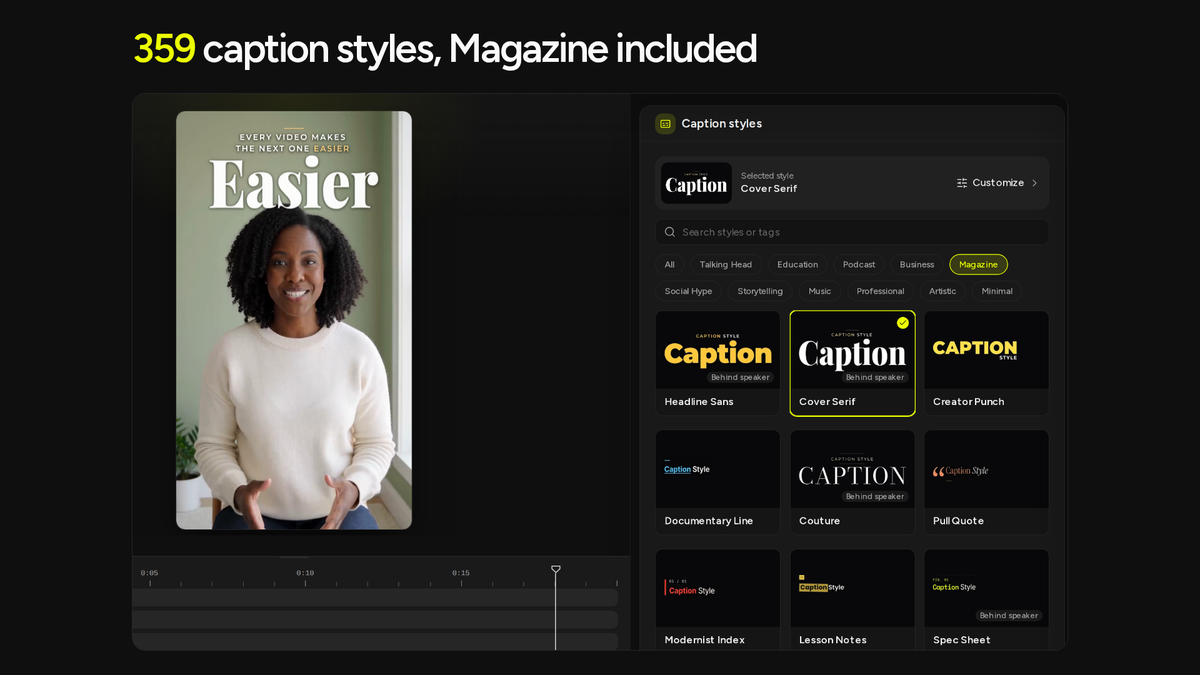
359 caption styles for any video with clear speech

  • Get word-by-word captions in your video's language, with 45 languages supported, then fix any word in Transcript
  • Hover over any of the 359 styles to watch it move before you apply it, on every tier
  • Try a Magazine layout that sets each line around one big main word and keeps clear of your face where it can
  • Choose Captions only when that's all you need, and add more in the Editor later
  • Find lines hidden under music with Deep scan, which helps recover missed captions at no extra processing minutes
359 caption styles for any video with clear speech

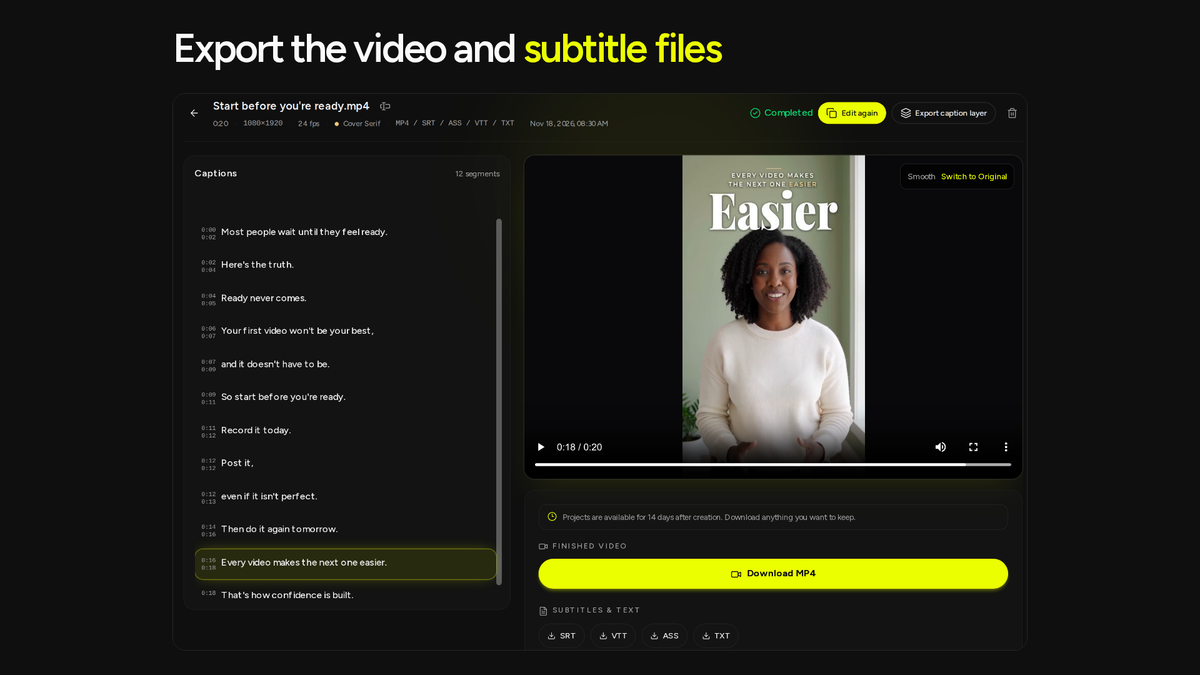
Brand it, size it, and export the files you need

  • Resize for Reels, Shorts, TikTok, LinkedIn, or YouTube with 9:16, 1:1, 4:5, or 16:9, or keep the original frame
  • Reuse your brand's look by saving your caption style, logo, and progress bar as a preset for your next video
  • Prepare your cover and post copy with 24 cover templates and editable drafts for TikTok, Instagram Reels, and YouTube Shorts
  • Download a watermark-free MP4 up to 4K, plus TXT on every tier; other subtitle formats depend on your tier
  • Continue in your editing app with a transparent caption layer (Tier 2 and up), or automate captioning and exports through the REST API and MCP server (Tier 3)
Brand it, size it, and export the files you need

Choose the plan that’s right for you

Feel secure in your purchase with AppSumo's 60 day money-back guarantee.

Recommended badgeRecommended
Refundable up to 60 days
Plus members are covered by our
We Got Your Back guarantee
Deal terms & conditions
CaptionBolt
See CaptionBolt
Founded October 15, 2023
Hong Kong
1-10
Startup
Bootstrapped

Auto Edit + a rebuilt Editor (included on all tiers)

Hi Sumo-lings,

Matt here, founder of CaptionBolt.

20 days after launching on AppSumo, we just shipped our biggest update yet. After Magazine captions, I rebuilt the Editor around one goal: upload a talking video and open a ready-to-review first draft—instead of staring at a blank timeline.

TL;DR:

  • Auto Edit turns raw talking footage into a first draft (hook, B-Roll, text, music, SFX, and camera moves).

  • Included on every AppSumo tier (including already-redeemed codes) with 0 extra processing minutes for Editor AI tools.

  • Test risk-free: Built-in 30s sample (0 minutes used) + 10 free minutes for new accounts.

Auto Edit: From raw video to first draft

Upload a tutorial, interview, or demo and pick Auto Edit. Based on what you say, CaptionBolt adds an opening hook, on-screen text, B-Roll, camera moves, emojis, music, and sound effects automatically.

Want less? Untick any item or stick with Captions only. Inside the Editor, you can jump straight to each AI addition, tweak individual elements, or undo the entire pass in one click.

(Editor AI tools use 0 extra processing minutes; fair-use limits apply. Transcribing your own uploads still uses your regular processing minutes.)

Try it with zero risk

  • Already have an account? Click Open sample next to the upload box (when Recent projects is empty) to play with an editable 30-second video—captions, hook, B-Roll, and music already loaded. Editing and exporting it uses 0 minutes.

  • Still deciding before buying? Every free CaptionBolt account includes 10 free minutes with full access to Auto Edit. I strongly recommend uploading your own footage and testing it thoroughly before grabbing an AppSumo tier.

What's new in the rebuilt Editor

  • Editable timeline: Move B-Roll, text, and sound right under the preview. Split, trim, delete, and click any cut to restore it.

  • Transcript-driven B-Roll: Attach stock or your own clips to any sentence (up to 30 clips per project), with dedicated cropping for Split screen.

  • Green screen (Beta): Place yourself in front of any background footage (up to 30s per clip) with export-accurate crop boxes.

  • Smarter pause cleanup: Previews how many pauses it will shorten and time saved, while keeping natural breaths. (Off by default on new projects.)

  • Face-aware hooks & emojis: Turn transcript words into timed overlays or lists—Auto Edit keeps them clear of your eyes and mouth when your face is visible.

  • Audio & motion: Built-in or custom music, drag-and-drop sound effects, and Punch in camera moves.

  • Video covers: Pick a frame, choose from 24 templates, and export as JPG or set it as your video's first frame.

  • Unified Brand tab: Logo, Progress bar, and Presets now live in one place under Brand.

Fixed from your feedback

  • Karaoke highlight colors: Changing Accent color now properly updates the highlight box across Creator Karaoke and 26 other styles (separate from Important word color).

  • No more stale edits: Reopening a project right after returning to the Dashboard now waits for your latest save.

  • Better global languages: Fixed letter joining for Hindi, Bengali, Tamil, and other Indic scripts; added language-compatible font indicators and right-to-left (RTL) transcripts for Arabic, Hebrew, Persian, and Urdu.

You'll find the full technical breakdown in the CaptionBolt changelog: https://captionbolt.com/changelog

What do you keep from your first Auto Edit, and what do you end up changing? Drop a comment in the Questions section below or email support@captionbolt.com (include a project link if it's about a specific video).

Thanks for backing us early and keeping the feedback coming.

Matt

Founder, CaptionBolt

Matt Liu
Founder

Questions & reviews

AskSumo

Customers appreciate CaptionBolt, praising its user-friendly interface, impressive captioning capabilities, and the ability to quickly create engaging short videos with B-Roll and music. Some minor drawbacks include the lack of automated clip-splitting, translation, and dubbing options, as well as no long-term cloud storage for projects. Users should be aware that while the tool is designed for finalizing videos, it may require some manual adjustments before exporting. However, the overall feedback is overwhelmingly positive, making CaptionBolt a fantastic choice for content creators. With a 60-day money-back guarantee, there's no risk in giving it a try—it's a solid investment for anyone looking to enhance their video content!

AI-powered summary of customer reviews