One-time purchase software: what paying once actually buys you

Last updated · By Chad Boyda, CTO at AppSumo

One-time purchase software, also called one-time payment software, is software you pay for once instead of every month or year. Paying once can mean four different things. Some keep working after the company is gone. Others stop the day its servers do. Below are 11 picks sorted by how long they last, plus 16 more.

Which kind of one-time software keeps working longest?

Open source lasts longest, then desktop apps you buy once. Lifetime deals on web apps depend most on the company staying in business. The difference is the license, the set of rules for how you may use the software, and it decides what you keep whatever you paid.

Which kind of one-time software keeps working longest?
Tier 1: Open sourceOpen source you install or host yourselfOpen source means the code is public and free to use. Desktop apps like LibreOffice install like any other app. Web tools like Cal.com and Penpot run on a server you rent or own.Cal.com, LibreOffice, PenpotIf the company disappears tomorrowNothing changes. You keep the code, your copy and your data.
Tier 2: Desktop licenseDesktop app you buy onceYou buy a perpetual license: the right to keep using the version you paid for, for as long as you like. It installs on your computer.Pixelmator Pro, DaVinci Resolve Studio, Final Cut Pro, Sublime TextIf the company disappears tomorrowYour copy keeps working. Updates and support stop.
Tier 3: Online activationDesktop app that checks in onlineLike tier 2, but the app must activate online with the maker's activation server, a computer that confirms your license.Microsoft Office Home & Business 2024If the company disappears tomorrowYour installed copy keeps working. A fresh install may fail to activate.
Tier 4: Lifetime dealLifetime deal on a web appYou pay once for access to a web app, software you use in a browser that runs on the maker's servers. Lifetime here means the life of the product.TidyCal, SendFox, BreezeDocIf the company disappears tomorrowAccess ends on the shutdown date. You keep only what you exported.

Lasting longest doesn't make it the right buy. Open-source web tools like Cal.com cost you a server to set up and maintain. If you need booking links by Thursday and never want to run a server, TidyCal at $29 is the better buy.

What subscription are you trying to stop paying for?

If you use one or two features of a monthly plan, paying once for those keeps the rest of the money in your pocket. Find the bill, then pick the option next to it. When two are listed, the first one lasts longer.

Calendly, for booking calls
Cal.com, TidyCalMore Calendly alternatives
Mailchimp, for an email newsletter
SendFoxMore Mailchimp alternatives
DocuSign, for e-signatures
BreezeDocMore DocuSign alternatives
Microsoft 365, for documents and spreadsheets
LibreOffice, Microsoft Office Home & Business 2024
Figma, for design files
PenpotDesign tools you pay for once
Photoshop, for photo editing
Pixelmator Pro
Premiere, for video editing
DaVinci Resolve Studio, Final Cut Pro
JetBrains or another paid code editor, for writing code
Sublime Text

What is one-time purchase software?

One-time purchase software, also called one-time payment or buy-once software, is software you buy with a single payment instead of a subscription that stops when you stop paying. You might get a license to one version on your computer, access to a web app for as long as it runs, or code you run yourself.

Which tools are worth buying once? 11 picks, longest-lasting first

Each one replaces a subscription people pay for today. Every price links to the maker's own page. Three are made by AppSumo, and their cards say so. There are 16 more after these.

Tier 1: Open source

Cal.com: booking calls without a scheduling subscription

Cal.com is a free, open-source booking tool. You share a link, people pick a time, and the meeting lands on your calendar. Host it yourself and it costs nothing, under the MIT license, which lets anyone use and change the code. Don't want a server? Cal.com also runs a hosted Free plan.

Best for

  • Developers who already run servers
  • Teams with rules about where their data is stored
  • Anyone who wants a booking tool with no bill to raise
Runs on
A server you host, for example on Railway, Render or Vercel. Guests book in any browser.
Price
Free to host yourself. Hosted Free plan $0. Hosted team plans $12 a user a month, billed yearly.
Limits
None when you host it, but you set up the server and keep it updated. The hosted Free plan leaves out team features.
Wrong for you if
you don't want to run a server or pay someone to.

Cal.com pricingChecked Nov. 15, 2026

Tier 1: Open source

LibreOffice: documents and spreadsheets without Microsoft 365

LibreOffice is a free word processor, spreadsheet and slide app. It opens and saves Word, Excel and PowerPoint files. It's open source, so nobody can switch it off, raise the price or move a feature to a paid plan. Microsoft 365 Personal costs $99.99 a year. LibreOffice saves you that every year.

Best for

  • Letters, invoices and everyday spreadsheets
  • Anyone who opens Office files but won't pay for Office
Runs on
Windows, macOS, Linux
Price
Free, for home and business use.
Limits
None. No account, no activation and no seat count (a seat is one person's paid login).
Wrong for you if
several people need to edit one file at the same time, or you rely on complex Excel macros (small programs inside a spreadsheet).

Download LibreOfficeChecked Nov. 15, 2026

Tier 1: Open source

Penpot: design files without a Figma seat

Penpot is a free, open-source tool for designing screens, apps and websites, and for clickable prototypes. Run it on your own server, or use Penpot's hosted Professional plan, which is also free. Figma Professional costs $16 a seat a month, billed yearly.

Best for

  • Small teams who won't pay per person for design
  • Developers who want design files in an open, standard format
  • Agencies handing files to clients with no license attached
Runs on
A server you host with Docker (a standard way to package an app for any server), or Penpot's hosted app. Designers work in a browser.
Price
Free to host yourself. Hosted Professional $0. Hosted Unlimited $7 an editor a month.
Limits
None when you host it. You maintain the server.
Wrong for you if
your clients and freelancers all work in Figma.

Penpot pricingChecked Nov. 15, 2026

Tier 2: Desktop license

Pixelmator Pro: photo editing without a Photoshop subscription

Pixelmator Pro costs $49.99 once on the Mac App Store. It handles the retouching, layers and masks most people open Photoshop for. Photoshop on its own costs $22.99 a month.

Best for

  • Mac users who edit photos
  • Editing on a laptop with no internet and no login
Runs on
macOS only
Price
$49.99 once, Mac App Store.
Limits
Mac only. No Windows, iPad or web version.
Wrong for you if
you're not on a Mac, or you also need print layout and vector drawing.

Pixelmator Pro on Apple's siteChecked Nov. 15, 2026

Tier 2: Desktop license

DaVinci Resolve Studio: video editing and color without Premiere

DaVinci Resolve is a video editor with color grading (changing the look of footage), effects and audio built in. The free version is enough for most people. Studio costs $295 once and adds AI tools, more effects and higher-end formats. It was on sale for $236 when we checked. Adobe Premiere costs $22.99 a month.

Best for

  • Editors who color-grade their own footage
  • Creators whose camera records more than the free version handles
  • Anyone who wants an editor with no monthly login
Runs on
Windows, macOS, Linux
Price
Free version $0. Studio $295 once ($236 on sale Nov. 15, 2026).
Limits
The free version stops at 8-bit color, Ultra HD (about 4K) and 60 frames a second. Studio removes those limits.
Wrong for you if
you swap Premiere project files with a team that uses Premiere.

DaVinci Resolve pricingChecked Nov. 15, 2026

Tier 2: Desktop license

Final Cut Pro: Mac video editing without a monthly fee

Final Cut Pro costs $299.99 once on the Mac App Store, and it installs on your Mac. It's built for Apple's own chips, so exports are fast. Apple also sells it inside a monthly bundle called Apple Creator Studio. You don't need the bundle to buy it once.

Best for

  • Mac editors cutting long videos or multi-camera shoots
  • Anyone leaving Adobe who wants no new subscription
Runs on
macOS only
Price
$299.99 once, Mac App Store.
Limits
Mac only. No Windows or Linux version.
Wrong for you if
you're not on a Mac.

Apple's Final Cut Pro pageChecked Nov. 15, 2026

Tier 2: Desktop license

Sublime Text: a code editor you buy once

Sublime Text is a fast code editor. A personal license costs $99 once and includes three years of updates. After that your copy keeps working, and you pay again only if you want newer versions. One license covers all your computers.

Best for

  • Developers who want a fast editor with no account
  • Opening huge files that slow other editors down
Runs on
Windows, macOS, Linux
Price
$99 once for a personal license, with three years of updates.
Limits
The one-time price is for personal licenses. A company buying for its staff pays a yearly fee per person.
Wrong for you if
you want built-in tools for finding bugs and checking code, set up for you.

Sublime Text storeChecked Nov. 15, 2026

Tier 3: Online activation

Microsoft Office Home & Business 2024: Word and Excel without the Microsoft 365 subscription

Office Home & Business 2024 costs $249.99 once for one PC or Mac. You get Word, Excel, PowerPoint and Outlook, and the right to use them for work. It sits in tier 3 because it must activate online with your Microsoft account. If Microsoft ever shuts that down, a fresh install may not activate.

Best for

  • One person on one computer who needs real Word and Excel
  • Businesses that must stay on one fixed version
Runs on
Windows or macOS, one computer
Price
$249.99 once, one PC or Mac.
Limits
One computer. No OneDrive cloud storage, Copilot AI, Teams or new features. Microsoft 365 Personal includes those for $99.99 a year.
Wrong for you if
you need Office on more than one device.

Microsoft's comparison pageChecked Nov. 15, 2026

Tier 4: Lifetime dealMade by AppSumo

TidyCal: booking calls without Calendly's yearly bill

4.3 out of 5 from 937 reviews · 119,955 bought

TidyCal is a booking tool AppSumo makes. The Individual plan costs $29 once. Calendly's Standard plan costs $10 a seat a month, billed yearly. TidyCal runs on our servers, so your links stop if TidyCal ever does. That's the tier-4 trade, and it applies to our own tools too.

Best for

  • Freelancers, coaches and consultants booking calls
  • People who use one or two features of a paid booking tool
  • Small teams of up to 4
Runs on
Any browser. Your booking link works wherever you paste it.
Price
Individual $29 once. Agency, for you plus 3 teammates, $79 once. 60-day refund.
Limits
If clients pay you when they book, TidyCal keeps 1% of each payment unless you add Pro ($99 a year). No phone app; it works in your phone's browser.
Wrong for you if
you need a phone app, a company-wide login for all your apps, or new leads routed to the right salesperson.

See the TidyCal deal

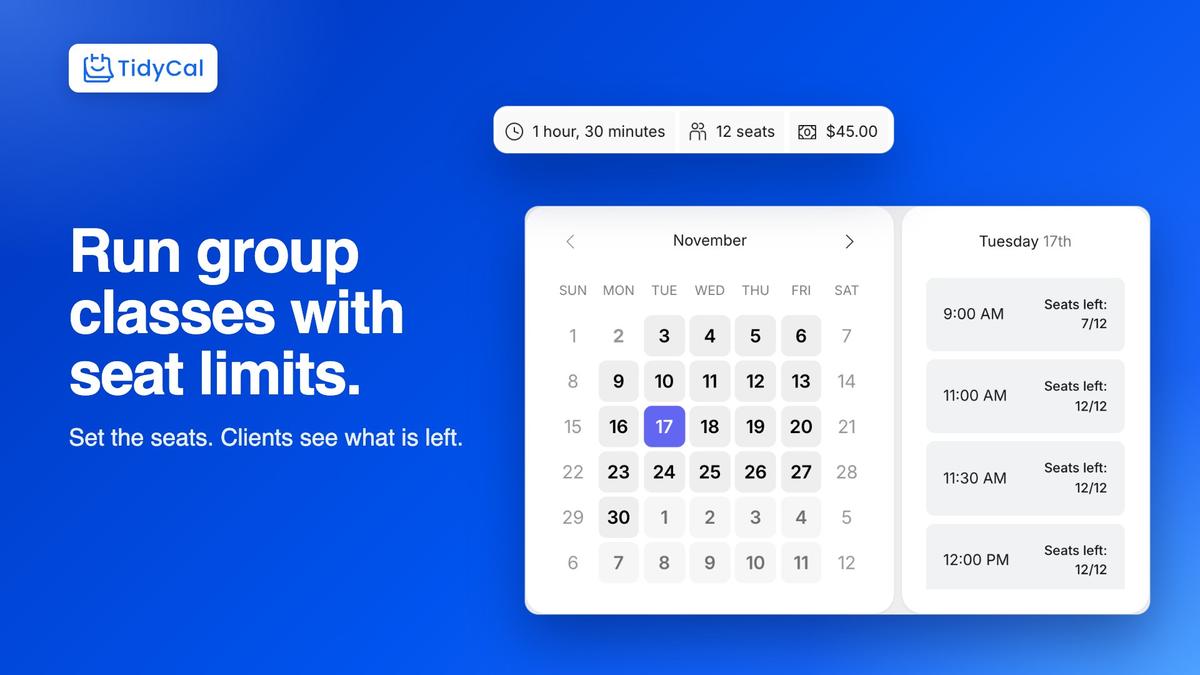
TidyCal group workshop booking page showing 12 seats and 7 of 12 seats left at 9:00 AM
Tier 4: Lifetime dealMade by AppSumo

SendFox: an email newsletter without Mailchimp's monthly bill

4 out of 5 from 342 reviews · 28,887 bought

SendFox is an email newsletter tool AppSumo makes. It costs $29 once for up to 5,000 contacts and 300,000 emails in total, for the life of the deal. That second number decides if it's a bargain for you. Mailing 5,000 people uses it up in 60 sends. Mailing 500 people gets you 600. Mailchimp Essentials starts at $13 a month for 500 contacts.

Best for

  • Writers sending weekly to a small list
  • Anyone paying monthly for a list of a few thousand people
  • A second list that doesn't need a second bill
Runs on
Any browser. Emails send from SendFox's servers.
Price
$29 once. 60-day refund.
Limits
5,000 contacts and 300,000 emails in total. An optional paid add-on called Empire bills monthly.
Wrong for you if
you'll pass 5,000 contacts or email your whole list every day.

See the SendFox deal

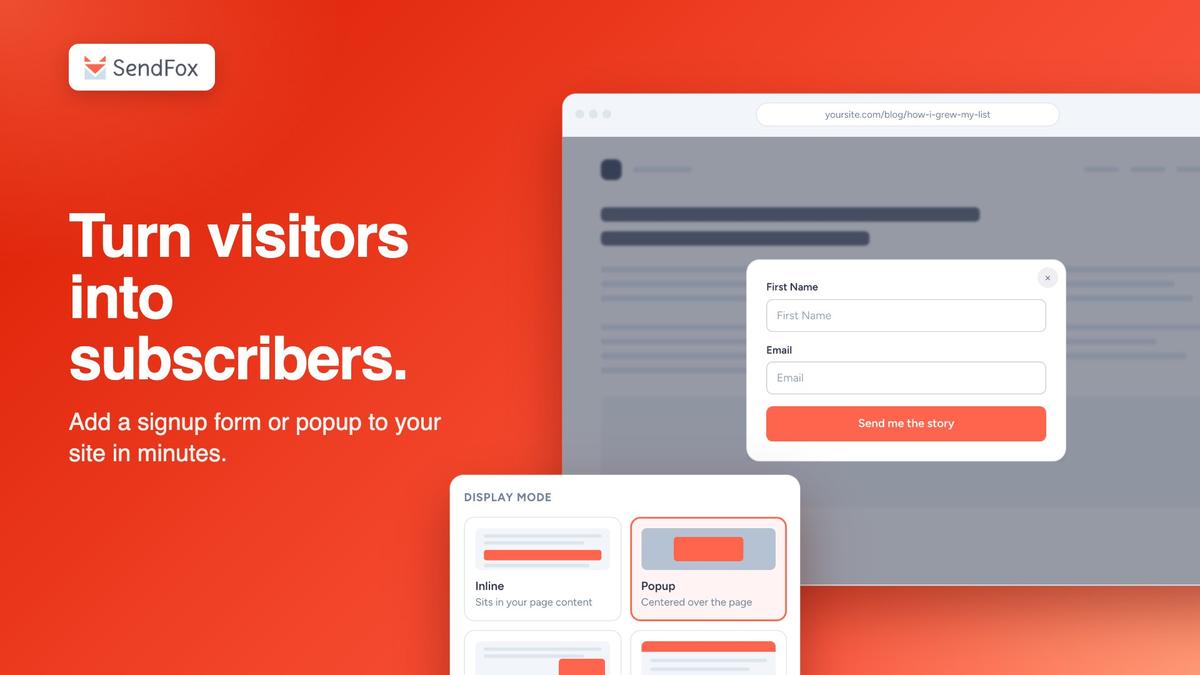
SendFox form builder showing a popup signup form
Tier 4: Lifetime dealMade by AppSumo

BreezeDoc: e-signatures without a DocuSign seat

3.7 out of 5 from 172 reviews · 24,180 bought

BreezeDoc lets clients sign contracts online. It costs $19 once. DocuSign Personal costs $11 a month. BreezeDoc is rated 3.7 out of 5, below TidyCal (4.3) and SendFox (4). We'd use it for a few freelance contracts a month. For contracts you might one day defend in a dispute, pick a tool built for that.

Best for

  • Freelancers sending a few client contracts a month
  • Anyone still printing, signing and scanning PDFs
Runs on
Any browser. People who sign don't need an account.
Price
Individual $19 once. Agency, with 4 team members, $49 once. 60-day refund.
Limits
Individual: 1 person, 10 public signing links (one link anyone can use to sign) and 100 signers per bulk send (one document sent to many people). Unlimited documents on every plan.
Wrong for you if
you need notarized signatures, strict compliance records or payments inside the document.

See the BreezeDoc deal

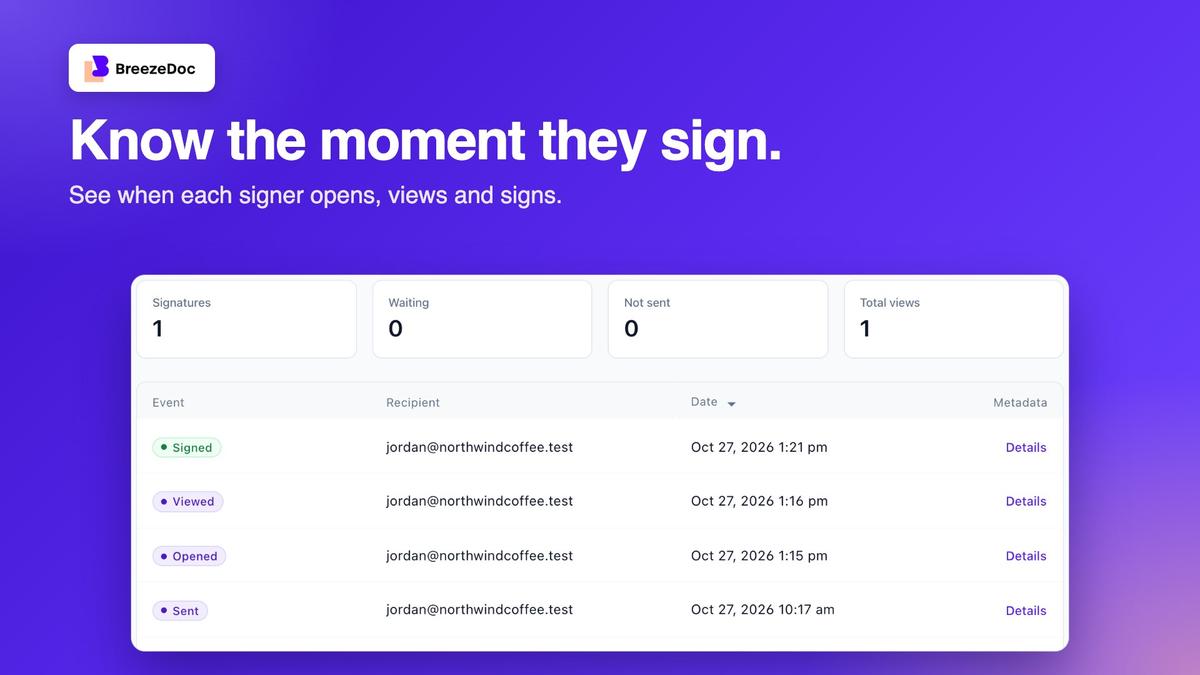
Know the moment they sign: BreezeDoc activity log showing sent, opened, viewed and signed

16 more tools you can buy once

These get a line each instead of a card. Same rules: each one replaces a subscription, and each price links to its source. None of them is made by AppSumo.

Windows, macOS and Linux

Seven of these ten are free and open source. GIMP, Inkscape and Blender are complete, full-featured apps.

Windows, macOS and Linux
GIMPPhotoshopFree, open source
Kritapainting and illustration subscriptionsFree, open source (also on Android)
InkscapeIllustratorFree, open source
Blender3D apps like Cinema 4D and MayaFree, open source
OBS Studioscreen recording and live-streaming subscriptionsFree, open source
ThunderbirdOutlook for emailFree, open source (also on Android)
KeePassXCpassword manager subscriptionsFree, open source
Beyond Comparefile and folder comparison subscriptions$35 Standard, $70 Pro (also merges two edited copies of a file with the original)
TablePlusdatabase app subscriptions$99 once, one year of updates (also on iOS)
REAPERPro Tools$60 for personal use or a business under $20,000 a year in revenue, $225 commercial

Mac only

Keyboard Maestro and Hazel automate your Mac, a job where buying once is still normal. BBEdit and Nova compete with free editors, so you pay for polish.

Mac only
BBEditsubscription text editors$59.99 once
Novasubscription code editors$99 once with a year of updates, then $49 a year if you want more
Keyboard Maestrodesktop automation subscriptions$36 once
Hazelfile automation subscriptions$42 once, one user

iPad and iPhone

Things 3 is sold per device, so the iPhone price isn't the whole price if you want it on your Mac and iPad too.

iPad and iPhone
Procreatedrawing app subscriptions (iPad)$12.99 once
Things 3to-do app subscriptions (iPhone)$9.99 for iPhone. Mac and iPad sold separately

Free rows are tier 1: open source that nobody can switch off. Paid rows are tier 2: the version you install keeps working.

How much does paying once save over five years?

Hundreds of dollars per tool, and over a thousand for some, if the tool you buy is still around in year five. The table adds up five years of each subscription at today's list price, then takes off the one-time price.

How much does paying once save over five years?
Calendly Standard$10/seat/month, billed yearly, checked Nov. 15, 2026TidyCal$29 once5 years of the subscription$600You keep$571
Calendly Standard$10/seat/month, billed yearly, checked Nov. 15, 2026Cal.comFree, before your server costs5 years of the subscription$600You keep$600
Mailchimp Essentials (500 contacts)$13/month, checked Nov. 15, 2026SendFox$29 once5 years of the subscription$780You keep$751
DocuSign Personal$11/month, billed yearly, checked Nov. 15, 2026BreezeDoc$19 once5 years of the subscription$660You keep$641
Photoshop$22.99/month, checked Nov. 15, 2026Pixelmator Pro$49.99 once5 years of the subscription$1,379.40You keep$1,329.41
Premiere$22.99/month, checked Nov. 15, 2026DaVinci Resolve Studio$295 once5 years of the subscription$1,379.40You keep$1,084.40
Microsoft 365 Personal$99.99/year, checked Nov. 15, 2026LibreOfficeFree5 years of the subscription$499.95You keep$499.95
Microsoft 365 Personal$99.99/year, checked Nov. 15, 2026Microsoft Office Home & Business 2024$249.99 once5 years of the subscription$499.95You keep$249.96
Figma Professional$16/seat/month, billed yearly, checked Nov. 15, 2026PenpotFree5 years of the subscription$960You keep$960

One person, list price, no price increases. Subscription prices tend to go up, so treat each saving as a floor. The Mailchimp row uses its 500-contact plan against SendFox's 5,000-contact limit, so the real gap is bigger.

Work out your own break-even

Break-even is the month when paying once becomes cheaper than paying monthly. Type what you pay now and the one-time price.

Example: Calendly Standard against TidyCal.

You break even in 3 months. Over five years you keep $571.

How do you judge a one-time price before you pay?

Ask what you'd still have if the company disappeared. Then decide if the price is fair for that.

  1. Count the reviews before you trust the stars. A 5.0 from eight reviews tells you less than a 4.0 from 300. Below about 50 reviews, the average tells you little.

  2. Find the limit you'll hit first. Lifetime deals usually cap something: contacts, emails or team members. SendFox, our own tool, allows 300,000 emails in total. At 5,000 contacts that's 60 sends. Work out which cap you reach first, and when.

  3. Check if it runs without the company. Tiers 1 and 2 do. Tier 3 does until you need to reinstall. Tier 4 doesn't. Over one year it barely matters. Over five, it's the question that decides.

  4. Find the export button before you buy. Check that you can download all your data in one go. If you can't, your data is stuck there, and leaving will cost more than the deal saved.

What happens to your software if the company shuts down?

Open source you host and desktop apps you installed keep running. A lifetime deal on a web app ends on the shutdown date, and you keep only the data you exported. Any money back depends on where you bought it.

What happens to your software if the company shuts down?
Open source you hostIf the product shuts down: Nothing changes.
Desktop license bought from the makerIf the product shuts down: Your installed copy keeps running. Refunds follow the maker's own policy.
Any AppSumo deal, inside its refund windowIf the product shuts down: A full refund to your original payment method. Most deals give you 60 days.
AppSumo Select or LaunchPad deal, with PlusIf the product shuts down: 100% back as AppSumo credit (store credit, not cash) if it closes within 12 months of purchase, or 24 months if you bought it while on Plus Pro Annual. Your Plus must be active on the closure date and before the closure was announced. If it has lapsed, the without-Plus terms apply.
AppSumo Select deal, without PlusIf the product shuts down: 50% back as AppSumo credit if it closes within 12 months of purchase.
AppSumo LaunchPad deal, without PlusIf the product shuts down: Nothing after the refund window.
AppSumo Radar deal, with or without PlusIf the product shuts down: Nothing after the refund window.

Select, LaunchPad and Radar are labels on each AppSumo deal page. Select tools are hand-picked and vetted by AppSumo. LaunchPad tools have early sales and lighter checks. Radar tools are brand new and only scanned for safety. AppSumo Plus is a paid membership.

To claim, email support@appsumo.com within 30 days of the day AppSumo announces the closure on the deal page. Miss that and you get nothing. TidyCal, SendFox and BreezeDoc are made by AppSumo. Their deal pages promise the 60-day refund and don't say whether this guarantee covers them, so count on the refund window only. We Got Your Back Guarantee, updated Aug. 31, 2026.

One more arrangement to avoid, outside the four kinds: a "lifetime subscription" resold by someone other than the maker. Access still ends if the maker shuts down, and your agreement may be with the reseller, so there may be nobody to claim from.

Common questions about buying software once

I want to charge my customers once. Is that this page?

No. This page is about software you buy once. Software that charges your customers a single payment is billing or invoicing software, such as HoneyBill, Invoiless or Billbooks. See billing and invoicing tools on AppSumo.

Is one-time purchase software cheaper than a subscription?

Yes, once you pass the break-even point, and for most tools in this guide that comes within the first year. Before that month, the subscription has cost you less. TidyCal costs $29 once. Calendly Standard costs $120 a year per person. Use the break-even calculator for your own numbers.

What is the difference between a perpetual license and a lifetime deal?

A perpetual license lets you keep using one version of an app on your own computer, for good. A lifetime deal gives you access to a web app for as long as that app exists. The perpetual license survives the company. The lifetime deal doesn't, because no copy lives on your computer.

Are lifetime deals worth it?

A lifetime deal is worth it when it replaces a subscription you already pay for a job you do now, and costs less than about two years of that bill. Check its limits and its export button first. It isn't worth it for a tool you haven't tried, for a job you haven't started.

What happens if a lifetime deal company shuts down?

Your access ends on the shutdown date, and you keep only the data you exported. On AppSumo, Plus members get 100% back as store credit on Select and LaunchPad deals that close within 12 months of purchase (24 months if bought on Plus Pro Annual), as long as Plus is active on the closure date. Other buyers get 50% on Select deals within 12 months. You must email support within 30 days of the closure announcement.

Can I get a refund on a one-time software purchase?

From the maker, it depends on their policy. On AppSumo, most deals have a 60-day refund for any reason. Each deal page states its own window, so check it before you buy.

Is there a one-time purchase alternative to Calendly?

Yes. Cal.com is free if you host it yourself, and TidyCal costs $29 once. Cal.com costs you server time. TidyCal costs you a bet that TidyCal stays in business. Calendly has a free plan, but its paid plans all bill monthly or yearly.

Is there a one-time purchase alternative to Canva or Figma?

Yes. Penpot is free and open source for design work, and you can host it yourself. For photos, Pixelmator Pro costs $49.99 once on a Mac, and GIMP is free on Windows, Mac and Linux. AppSumo also lists Canva alternatives you pay for once.

Does Microsoft still sell Office as a one-time purchase?

Yes. Office Home & Business 2024 costs $249.99 once for one PC or Mac, with Outlook and the right to use it for work. Office Home 2024 costs $179.99 but leaves out Outlook and business use. Neither includes OneDrive storage, Copilot or new features. Those come with Microsoft 365 Personal at $99.99 a year.

What one-time purchase software runs on Windows or Linux?

Every open-source tool here runs on Windows, macOS and Linux: LibreOffice, GIMP, Krita, Inkscape, Blender, OBS Studio, Thunderbird and KeePassXC. So do DaVinci Resolve, Sublime Text, Beyond Compare and REAPER. Pixelmator Pro, Final Cut Pro and the Mac-only tools need a Mac.

How we checked

AppSumo sells lifetime deals, the least durable kind on this page. Three of these tools, TidyCal, SendFox and BreezeDoc, are ours, and we make money when you buy them. We make nothing on the other 24.

  • Prices come from each maker's own pricing page or app store listing, read on Nov. 15, 2026. Each card links to its source.
  • AppSumo prices, ratings, review counts and bought counts come live from each deal page.
  • Every price is stored with its source and the date we checked it. The page never shows a price we don't have on record.
  • Tools are ordered by durability: what you'd still have if the maker shut down. Price and quality don't change the order.
  • Shutdown terms and the Select, LaunchPad and Radar descriptions come from AppSumo's We Got Your Back Guarantee, updated Aug. 31, 2026.

Sources

  1. 1.Cal.com pricingChecked Nov. 15, 2026
  2. 2.LibreOfficeChecked Nov. 15, 2026
  3. 3.Penpot pricingChecked Nov. 15, 2026
  4. 4.Pixelmator ProChecked Nov. 15, 2026
  5. 5.DaVinci ResolveChecked Nov. 15, 2026
  6. 6.Final Cut ProChecked Nov. 15, 2026
  7. 7.Sublime Text storeChecked Nov. 15, 2026
  8. 8.Microsoft 365 and Office comparisonChecked Nov. 15, 2026
  9. 9.Adobe Creative Cloud plansChecked Nov. 15, 2026
  10. 10.Figma pricingChecked Nov. 15, 2026
  11. 11.Calendly pricingChecked Nov. 15, 2026
  12. 12.Mailchimp pricingChecked Nov. 15, 2026
  13. 13.DocuSign eSignature plansChecked Nov. 15, 2026
  14. 14.TidyCal pricingChecked Nov. 15, 2026
  15. 15.AppSumo We Got Your Back Guarantee
  16. 16.AppSumo refund policy

Browse one-time purchase software on AppSumo

AppSumo sells lifetime deals on web apps, tier 4 on this page. Most come with a 60-day refund, and the shutdown terms are written down before you buy. If you're happy running your own install, LibreOffice, Penpot and Cal.com are free.