Bulk Image Studio Founders Edition
Mac version is coming
View Product Roadmap
https://rckernapps.com/roadmap
Bulk Image Studio turns scattered prompts into organized desktop batch workflows using your own OpenAI API, one-time purchase, lifetime access
Bulk image generation should not require a maze of browser tabs, prompt files, folders, provider dashboards, spreadsheets, and manual checks.
That frustration is what led to the creation of Bulk Image Studio Founders Edition.
Before building Bulk Image Studio, creating images in volume meant constantly moving between prompt documents, image-generation services, API settings, output directories, test generations, and provider dashboards. Generating a single image was rarely the difficult part.
The real challenge was managing the entire workflow.
When you are producing dozens, hundreds, or even thousands of images for books, advertising, social media, games, websites, products, character concepts, or other creative projects, small mistakes can become expensive very quickly.
A prompt can be skipped.
The wrong provider can be selected.
Files can end up in the wrong directory.
Settings can change halfway through a project.
API credits can be wasted testing configurations that should have been checked beforehand.
And once a project grows beyond a handful of images, simply remembering what has already been generated can become a project of its own.
Bulk Image Studio Founders Edition was created to bring that workflow together inside one desktop application.
Instead of treating every generation as an isolated image, Bulk Image Studio is designed around the idea of a project and batch workflow.
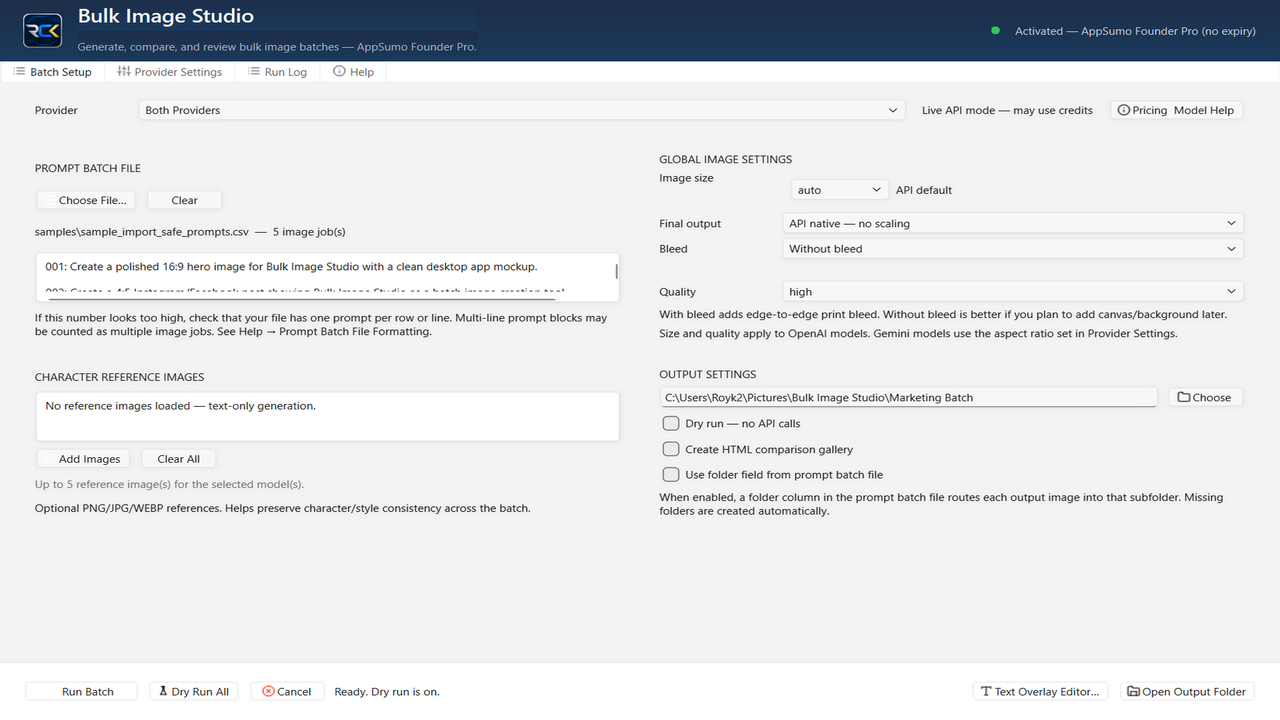
Load your prompts. Configure your generation workflow. Select a supported provider. Review your settings. Test the configuration. Organize your output. Then run the batch.
The goal is simple:
Spend more time creating and less time managing the mechanics of image generation.
Built for Real Bulk Image Projects
Bulk Image Studio Founders Edition is intended for creators who regularly need more than one image.
That includes:
Authors creating book illustrations, concept art, promotional graphics, or character imagery.
Publishers producing visual assets for multiple books or campaigns.
Game developers generating characters, environments, props, textures, and concept artwork.
Marketers building large collections of campaign graphics.
Social-media creators producing visual content across multiple platforms.
Web designers generating graphics, backgrounds, thumbnails, and promotional assets.
Product creators developing mockups, concepts, advertising imagery, and visual variations.
Agencies managing repeated image-generation workflows.
AI creators experimenting with different prompts and providers.
Anyone who works with large prompt collections and wants a more organized way to generate the resulting images.
Instead of copying and pasting prompts one at a time into a browser interface, you can prepare a prompt file and manage the project as a batch.
Bring Your Own API Keys
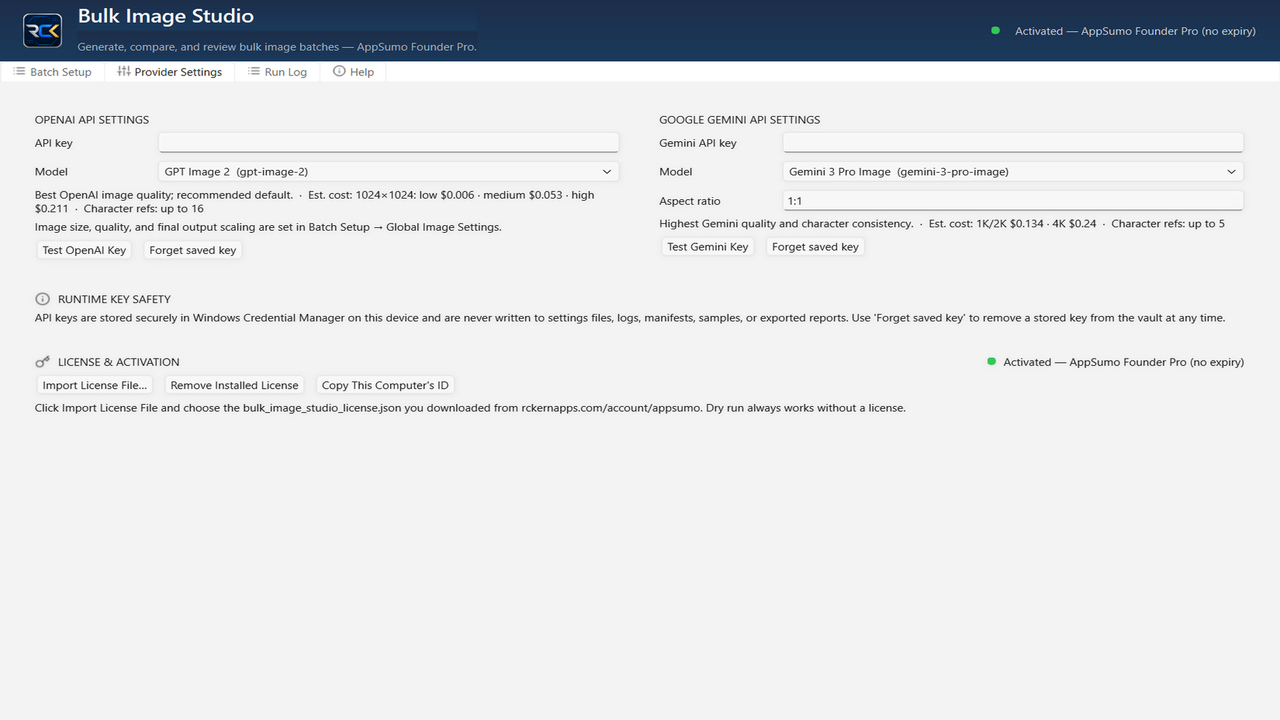
Bulk Image Studio Founders Edition uses a bring-your-own-key model.
Your software license and your image-generation usage are intentionally kept separate.
The purchase of Bulk Image Studio does not include unlimited AI generations or hidden bundles of API credits.
Instead, you connect your own supported provider account and API credentials.
This gives you greater control over:
Which providers you use.
Which provider plans you purchase.
How much you spend.
Which models you choose.
How frequently you generate images.
How you manage your own provider accounts.
You pay the image-generation provider directly according to that provider's pricing and terms.
Bulk Image Studio provides the workflow that helps you organize and operate those generation jobs.
That distinction is important because it allows the application to remain useful even as AI providers, models, and pricing continue to evolve.
Test Before You Spend
One of the most important parts of working with API-based image generation is making sure your project is configured correctly before starting a large batch.
Bulk Image Studio includes a Dry Run workflow designed to help you review your setup before committing API resources to a full generation job.
A dry run can help you identify problems such as:
Incorrect configuration.
Missing information.
Bad output paths.
Prompt-loading problems.
Workflow mistakes.
Provider setup issues.
The purpose is straightforward:
Catch problems before they become expensive problems.
When a project contains hundreds of prompts, discovering a configuration mistake after the batch begins can waste both time and API credits.
Bulk Image Studio gives you a structured checkpoint before generation begins.
Organize Prompts and Outputs
Bulk generation creates another problem that single-image tools rarely address well:
Where does everything go?
Bulk Image Studio helps organize the relationship between your prompt files, project settings, provider workflow, and generated output.
Instead of manually managing every image independently, you can build a repeatable project structure.
That makes Bulk Image Studio especially useful for recurring projects.
For example, an author might maintain separate projects for:
Character portraits.
Chapter illustrations.
Book advertisements.
Social-media graphics.
Website artwork.
A game developer might maintain separate batches for:
Characters.
Environments.
Weapons.
Vehicles.
Props.
UI artwork.
Promotional images.
A marketing team might organize batches around:
Facebook campaigns.
Instagram posts.
Instagram Stories.
Website banners.
Product advertisements.
Email graphics.
YouTube thumbnails.
The software becomes the workspace connecting those prompts and generation jobs.
Global Settings for Consistent Workflows
Bulk projects often require the same configuration across many prompts.
Bulk Image Studio provides global settings that allow creators to establish common project parameters instead of repeatedly configuring each generation manually.
This helps create more repeatable workflows and reduces the possibility of accidental configuration changes during a large project.
The exact capabilities available may depend on the selected provider and model, but the overall objective remains the same:
Configure the project once, then let the batch workflow handle the repetition.
Multiple Provider Workflows
The AI image-generation industry changes quickly.
New models appear.
Providers change pricing.
Capabilities improve.
Specialized models emerge for different creative tasks.
Bulk Image Studio is designed around provider workflows rather than forcing every user into one image-generation ecosystem.
The Founders Edition supports the provider integrations included with the stable V1 release, while the Bulk Image Studio platform is being developed with future provider expansion in mind.
Different providers may support different:
Models.
Image sizes.
Quality levels.
Styles.
API parameters.
Pricing structures.
Generation capabilities.
Bulk Image Studio gives creators a central desktop workflow for working with supported providers without having to redesign their entire project organization each time they change generation services.
Designed for Creators — Not Just Developers
API-based AI tools are powerful, but many still assume that users are comfortable writing scripts, managing command-line tools, building API requests, or creating their own automation systems.
Bulk Image Studio was created to provide a more approachable desktop workflow.
You should not need to build your own Python script simply because you want to send 200 prompts to an image-generation provider.
Bulk Image Studio handles the workflow so creators can focus on the creative project.
You provide the prompts.
You select the provider.
You configure the job.
You choose where the results go.
Bulk Image Studio handles the structured batch workflow.
A Practical Desktop Workflow
Bulk Image Studio Founders Edition is not marketed as an unlimited-image service.
It is not an API-credit subscription.
It is not a replacement for the image-generation providers themselves.
And it does not claim to magically remove the cost of AI generation.
It is something much more practical:
A desktop production tool for organizing and running bulk AI image-generation projects.
For creators who regularly generate many images, that organization can save significant time.
Instead of rebuilding the same workflow every time you start a project, Bulk Image Studio gives you a repeatable system.
What the Founders Edition Includes
The Bulk Image Studio Founders Edition represents the stable V1 release being introduced through AppSumo.
It is intended for early customers who want to begin using the Bulk Image Studio workflow while the larger platform continues to grow.
Founders Edition customers receive access to the V1 application and its supported workflows under the terms of the AppSumo offer.
The Founders Edition is intentionally focused on providing a stable, usable foundation rather than promising every provider or advanced capability planned for future editions.
As the Bulk Image Studio ecosystem expands, additional products and more advanced versions may introduce broader provider support, professional workflows, automation capabilities, and other advanced functionality.
The Founders Edition remains the original entry point into the Bulk Image Studio platform.
Why Bulk Image Studio Exists
AI has made creating images dramatically faster.
But managing AI image generation has not always kept pace.
Once you move beyond creating one image at a time, the workflow becomes increasingly complicated.
Bulk Image Studio was created because the next stage of AI creativity is not simply generating another image.
It is managing production.
Managing hundreds of prompts.
Managing providers.
Managing output.
Managing costs.
Managing repeatable workflows.
Managing creative projects that may contain hundreds or thousands of assets.
That is the problem Bulk Image Studio is designed to solve.
Create at the Scale Your Project Requires
Whether you are creating ten images or preparing a project containing hundreds of prompts, Bulk Image Studio gives you a more structured way to move from idea to generation.
Prepare your prompts.
Load your project.
Choose a supported provider.
Configure your settings.
Run a dry test.
Select your output location.
Launch your batch.
Then let Bulk Image Studio handle the repetitive workflow while you focus on what you are actually trying to create.
Bulk Image Studio Founders Edition
Bulk image generation without the workflow chaos.
Bring your own API key. Organize your prompts. Test your setup. Run your batch. Build more.